

 Back to templates
 Google Slides Templates - Page 3

Department Org Chart Template focuses on one business unit so managers can show roles, team leads, responsibilities, and reporting relationships without displaying the whole company. It includes editable sections for a department head, managers, specialists, coordinators, and support roles, connected in a logical structure. Department leaders, HR professionals, team managers, and project coordinators can use it for onboarding, workload planning, or internal updates. A focused chart helps employees see who to contact for approvals, support, and specific tasks. You can update the free layout with names and functions, then download, print, or distribute it digitally.


Does your nonprofit need to make the relationship between the board, executive leadership, employees, committees, and volunteers easier for everyone to understand? Nonprofit Org Chart Template provides structured space for board members, officers, an executive director, program teams, development staff, administrative roles, and volunteer coordination. Charities, foundations, community groups, and associations can use it to explain governance and day-to-day operations to staff, funders, and new board members. The chart helps distinguish board oversight from operational management and clarifies the roles supporting each program. It is free to edit, ready to personalize, and suitable for reports, orientation materials, or meetings.

Corporate Org Chart Template helps larger organizations present complex structures across executive leadership, divisions, functional departments, and management layers. It offers editable areas for C-suite roles, directors, department heads, employees, reporting lines, and dotted-line relationships where needed. Corporations, enterprise HR teams, and business consultants can adapt it for workforce planning, annual reports, company presentations, and internal directories. The visual map makes it easier to understand how departments connect and how authority moves through the organization. Available free of charge, it can be customized with company branding and prepared for print or digital distribution.

Are new team members unsure who handles design, operations, client communication, or decision-making within a project group? Team Org Chart Template maps individual roles, team leads, functional responsibilities, and working relationships in a concise visual. Project managers, startup founders, agency leads, and cross-functional teams can use it to introduce colleagues, assign ownership, and make collaboration smoother. The layout is useful for showing a focused workgroup without having to include the entire organization. You can edit each role and connector for free, then download, print, or share the chart with the team.

Hierarchical Org Chart Template uses a familiar top-down structure to show leadership at the top, managers beneath them, and individual contributors or teams at lower levels. Each editable box can include a person’s name, role, department, and optional contact details, while connecting lines show direct reporting relationships. It works especially well for organizations with a defined chain of command, specialized departments, and clear levels of authority. HR teams, executives, and managers can use it to clarify accountability, guide onboarding, and communicate reorganizations. The template is free, easy to modify, and suitable for printing or presenting in meetings.

Need to build an organizational chart around your own structure without deleting someone else’s sample departments first? Blank Org Chart Template provides an open canvas with editable placeholders, connectors, and hierarchy levels that can be filled with your own names, teams, and reporting lines. It suits new companies, consultants, teachers, project leaders, and anyone designing an organization from the ground up. The flexible layout can become a company-wide map, a department diagram, or a chart for a temporary project team. It is free to customize, simple to duplicate, and ready to download, print, or share.

Business Organizational Chart Template presents a company’s leadership, departments, functions, and reporting relationships in a structured overview. It includes editable boxes for names, job titles, team labels, and connectors that show how authority and communication flow through the business. Small businesses, startups, consultants, and established organizations can use it for strategy decks, hiring plans, employee handbooks, or stakeholder meetings. The organized structure makes gaps, overloaded management layers, and unclear responsibilities easier to identify. You can tailor the content for free and use the finished chart in print or digital communications.

Does your company need a clear visual that shows who leads each function and where every role sits in the reporting structure? Company Org Chart Template organizes executives, managers, teams, job titles, and reporting lines into one easy-to-read hierarchy. Founders, HR teams, operations managers, and department heads can use it for onboarding, planning, reorganizations, or internal communication. The visual layout helps employees understand who owns which responsibilities and where to direct questions. It is free, editable, and ready to download, print, or present once you add names, roles, and departments.

Colorful SWOT Analysis Template uses distinct colors for each quadrant to make strengths, weaknesses, opportunities, and threats visually distinct at a glance. Trainers, presenters, and team leads can use it when they want a more engaging, memorable SWOT for workshops or client meetings. The color coding helps the audience follow the logic and recall key points later. You can modify colors, text, and design elements for free and prepare the SWOT for print or digital presentation.

Do leaders and teams need a single, organized view of the company’s strategic position before making key decisions? Company SWOT Analysis Template brings together organizational strengths, weaknesses, market opportunities, and threats in one presentation-ready framework. Executives, consultants, and business students can use it for board updates, strategy offsites, or case studies. The structured layout makes complex information easier to communicate and prioritize. It is free, editable, and ready for downloading, presenting, or sharing with stakeholders.
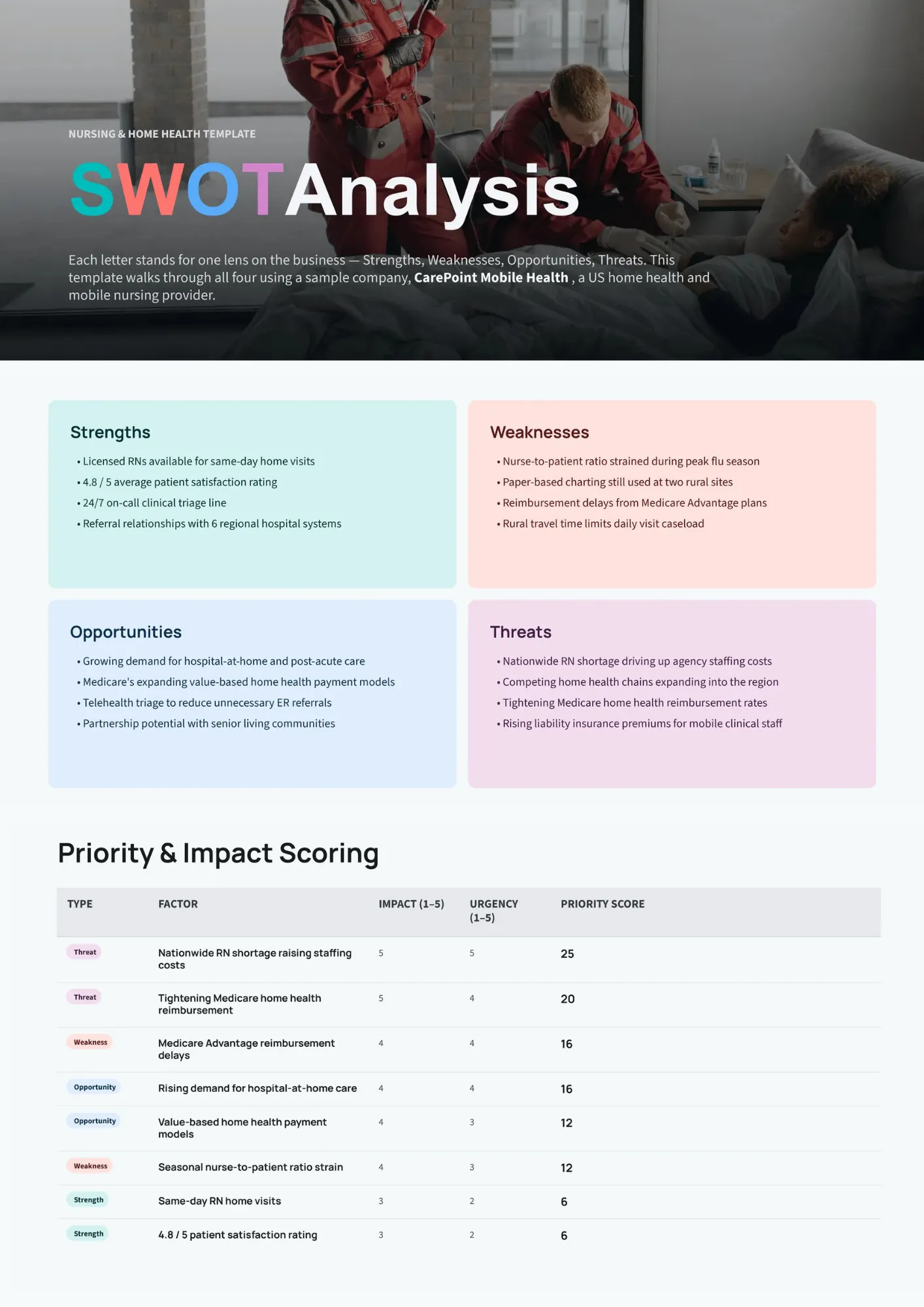
Nursing SWOT Analysis Template helps healthcare professionals and departments evaluate internal capabilities and external factors affecting patient care and operations. Nurses, nurse managers, and educators can use it to assess units, programs, or career paths within the healthcare environment. The four-quadrant format supports clear discussion of resources, challenges, trends, and risks. You can tailor the content for free and use the analysis for planning, accreditation, or professional development.

Are you trying to understand how your competitors compare to your own business but lack a structured way to capture it? Competitor SWOT Analysis Template lets you map rivals’ strengths, weaknesses, opportunities, and threats side by side with your own perspective. Marketers, founders, and strategy teams can use it to spot market gaps, threats, and potential differentiators. The visual comparison makes competitive insights easier to discuss and act on. It is free to customize and suitable for presentations, workshops, or internal strategy documents.

Simple SWOT Analysis Template strips away extra graphics to provide a straightforward matrix for listing strengths, weaknesses, opportunities, and threats. Small teams, startups, and educators can use it when clarity and speed matter more than elaborate design. The clean layout makes it easy to fill in quickly and present without distractions. You can adjust text, colors, and formatting at no cost and reuse the template across different projects.

Do you need a classic 2×2 SWOT layout that is instantly recognizable and easy for any audience to read? 4-Quadrant SWOT Analysis Template offers a balanced grid with dedicated spaces for strengths, weaknesses, opportunities, and threats. Consultants, teachers, and team leads can use it for strategy sessions, classroom activities, or executive updates. The symmetrical design ensures each quadrant gets equal attention and keeps the analysis focused. It is free, fully customizable, and ready for downloading, printing, or presenting.

Personal SWOT Analysis Template guides individuals through a self-assessment of strengths, weaknesses, opportunities, and threats in their career or personal growth. Students, job seekers, and professionals can use it to clarify goals, identify skill gaps, and plan development steps. The four-quadrant structure turns vague ideas into a clear action-oriented overview. You can personalize the content for free and use the template for coaching, mentoring, or self-reflection.

Are marketing plans often based on assumptions instead of a clear view of the market and your position? Marketing SWOT Analysis Template organizes brand strengths, gaps, market opportunities, and competitive or environmental threats into a focused framework. Marketers, agency teams, and business owners can use it to shape campaigns, positioning, and channel strategy. The structured quadrants make it easier to connect insights with concrete actions. It is free to edit, simple to adapt, and suitable for presenting or sharing as part of a marketing plan.

Choose your preferred social media platform from options like Pinterest, Facebook, Twitter, and more. Share our templates with your contacts or friends. If you’re not active on these social networks, you can simply copy the link and paste it into the one you use.